


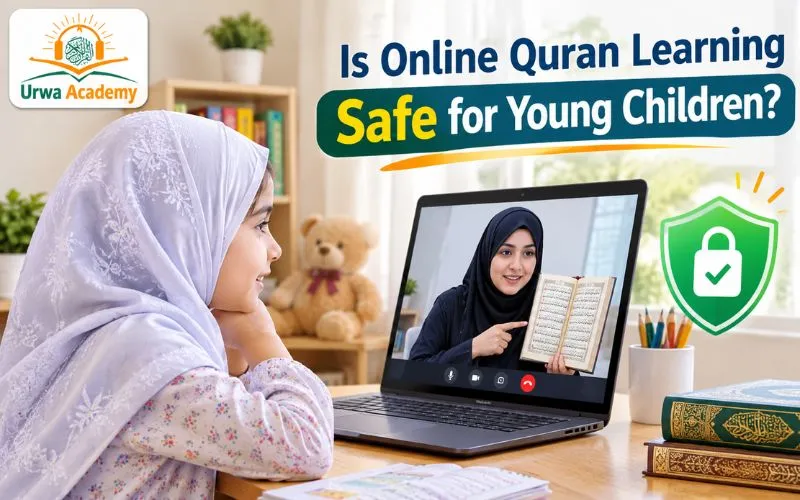
Is online Quran learning safe for young children? It can be, but it isn’t safe automatically. Safety comes from four things working together: a teacher who has been properly vetted, a lesson setup you control, clear rules on contact, recording and privacy, and a sensible amount of screen time. No academy and no app can promise all four on its own. A big part of it sits with you, and most of it is simple once you know what to look at.
Parents ask this question first, before price, before schedule, before anything else. That’s the right instinct. So let’s go through it properly.
“Safe” means four different worries
When a parent says “I’m worried it won’t be safe,” they usually mean one of four separate things. Mixing them up is how people end up either panicking or relaxing too early.
- Who is teaching my child? (the teacher)
- What is the lesson like while it’s happening? (the setup)
- Where do pictures, video and information about my child go? (privacy and recording)
- How much screen time is this adding? (the screen)
Take them one at a time.
1. Who is teaching my child?
This is the biggest one, and it has two halves that people often blur together.
The first half is whether the teacher is qualified to teach the Quran. Do they read accurately? Do they know Tajweed? Can they teach a six-year-old without frightening them? That’s about teaching quality. We explain how we check it in How We Vet Our Quran Tutors: qualifications, Hifz, a direct Tajweed assessment, and months of training before a tutor takes a student.
The second half is whether the person is safe to be alone with a child, even on a screen. That’s child protection, and it’s a different question. A brilliant reciter and a safe adult are not the same thing, and one doesn’t prove the other.
Organizations that work on child protection treat one-to-one teaching as a setting that needs its own thought. The NSPCC, the UK children’s charity, runs training specifically for tutors who teach one-to-one or in small groups, whether in person or online, and says the policies and procedures should be in place before anyone starts working with children. In other words, a good academy shouldn’t be working out its approach after your child has already joined.
So ask any academy, including us, two separate questions:
- How do you check that your teachers can teach?
- How do you look after children’s safety, and what happens if a child or parent has a concern?
You should get a calm, clear answer to both. If you get a vague one, or irritation that you asked, that’s useful information. We’d rather you ask us before the trial, not after.
For a fuller checklist, see our guide to choosing a safe, qualified Quran teacher.
2. What the lesson looks like while it’s happening
A lot of safety is just setup. These are all things you can control.
Where your child sits. A shared space, like a living room or a corner of the kitchen, is better than a bedroom with the door shut. You want the lesson to be something the household can walk past and hear.
Who is in the call. It should be your child and the teacher, with you nearby. If other people appear in the lesson, you should know who they are and why.
How people join. Use a private link, and where the platform allows it, a waiting room or passcode. A waiting room means the host has to approve each person before they enter, even if they have the link. The online safety charity Childnet recommends turning this on in apps like Zoom. Zoom’s host controls also let the host lock a meeting once it has started, so no one else can enter, and remove anyone who shouldn’t be there.
Whose account it is. Childnet notes that Zoom’s age limit is 16 and over, so a young child shouldn’t have their own account. They join through a link, on your device, with you setting it up.
What the camera sees. Point it at the desk and the book. Not the bedroom, not the family photos, not the street through the window.
Your child’s “off switch.” Teach them that if anything feels strange, they can end the call or turn the camera off and come and get you, and that they won’t be in trouble. Childnet’s advice to young people on video calls says the same: you can always say no, and you can end a call if someone says or does something that upsets you.
Where the teacher and child talk. Good practice, and a basic expectation, is that contact stays inside the academy’s own channels. No private messaging with your child, no friend requests, no gifts, no meeting up. Neither the NSPCC’s tutor training page nor Childnet’s call advice spells these out as specific rules, so treat this as good practice, not an official standard. But it’s what a careful academy does, and it’s reasonable to ask for it.
If you want to know what a normal first session looks like so you can spot anything odd, our post on what happens in a first Quran lesson walks through it.
3. Recording, photos and privacy
This one catches families off guard, because it’s the part you often can’t see.
Some academies record lessons. There can be good reasons, such as quality checks or letting a parent catch up. But a recording of your child is personal information, and it deserves a proper answer. The NSPCC’s guidance on filming children is useful here. It says a recording of an identifiable person is personal data, it must have a clear and specific purpose, and it should only be used for that purpose. It recommends:
- Written consent from parents and carers, with the child’s own agreement as well.
- A written policy on what happens to recordings: how long they’re kept, where they’re stored, who can see them, and how they’re securely deleted.
- Recordings managed centrally by the organization, not kept by individual teachers on their own phones.
- The right to say no, or to change your mind later.
- Recording never replacing other safeguarding measures.
That guidance is from the UK, and rules differ across the UK, USA, Canada and Australia. But the questions are the same everywhere. Ask:
- Do you record lessons?
- Why, and who can see the recordings?
- How long do you keep them?
- Can I say no?
Also check what you’re allowed to do. Childnet advises getting everyone’s consent before taking or sharing a screenshot of a call. That includes the family: don’t post your child’s lesson online without the teacher’s agreement, either.
4. How much screen time is this?
Fair question, and a lesson is not nothing.
The American Academy of Pediatrics’ long-standing guidance, as summarized by Mayo Clinic, is that children under 18 months should mostly avoid screens apart from video chatting, and children aged 2 to 5 should have about an hour a day of high-quality programming. For older children there’s no single limit. Mayo Clinic’s own advice is that quality matters more than the device or the exact number of minutes, and that parents should set reasonable limits that suit their child. These recommendations get updated, so it’s worth checking the AAP’s current guidance for your child’s age.
What does that mean for a Quran lesson?
- A live lesson isn’t the same as passive viewing. There’s a real person responding to your child, which is the kind of screen use experts tend to be more comfortable with. (We covered why this matters in how to keep a young child focused during Quran lessons.)
- It still counts. If your child has a lesson and then an hour of cartoons, that’s a lot of screen for one day. Adjust the rest of the day.
- Keep lessons short for young ones, and protect sleep. A late lesson that pushes bedtime back costs more than it gives.
Red flags that should make you pause
- The academy can’t tell you who its teachers are or how they were chosen.
- No clear answer on safeguarding, or on who to contact with a concern.
- The teacher asks to talk to your child privately, or to move to a personal chat or phone number.
- Lessons are recorded and nobody asked you.
- Your child is told not to tell you about something.
- You’re discouraged from sitting nearby, or the teacher resists a parent being present.
- Pressure to pay or commit before you’ve had a chance to see a lesson.
Any one of these is a reason to stop and ask questions. A trustworthy teacher will not mind.
A simple checklist before the first lesson
- I know the teacher’s name and how the academy vets its teachers.
- I’ve asked what the academy’s safeguarding approach is.
- I know whether lessons are recorded, why, and who sees them.
- The lesson happens in a shared space, with me nearby.
- My child joins by link, not with their own account.
- My child knows they can end the call and tell me anything.
- I know how to contact the academy with a concern.
What if something doesn’t feel right?
Trust the feeling. End the call. Talk to your child calmly, without interrogating them, and write down what happened. Then raise it with the academy, and expect a proper response. If a child may have been harmed or an adult is behaving inappropriately, contact your local child protection authority or police. In the UK, the NSPCC and Childline can advise. In the US, the National Center for Missing & Exploited Children runs a CyberTipline for reporting concerns.
So, is it safe?
It can be, and many families use it happily for years. It isn’t risk-free, just as no setting where an adult teaches a child is risk-free, whether that’s a masjid, a school or a living room. The difference is knowing what to look at. If you’re weighing online learning against a local masjid option, our honest comparison of online vs. local masjid Quran classes covers the trade-offs. And once your child is settled into lessons, our guide to the signs your child is ready to start Hifz is a good next read.
At Urwa Academy, we share progress with parents each month and meet parents to work through any problems together. If you’d like to know how we handle privacy and safety before you book anything, ask us. And if you’re comparing online Quran classes for your family, put these questions to every academy you consider, us included.
Frequently Asked Questions
Is online Quran learning safe for young children?
It can be, when a few things are in place: a properly vetted teacher, a lesson that takes place in a shared space with a parent nearby, clear rules on contact and recording, and sensible screen time. No platform makes it safe automatically, so parents should ask the academy direct questions and check the setup.
Should a parent stay in the room during an online Quran lesson?
For young children, yes. Stay nearby, ideally within earshot, and keep the lesson in a shared space rather than a closed bedroom. A good teacher won’t mind a parent being present.
Are online Quran lessons recorded?
Some academies record lessons and some don’t. If recordings are made, they are personal data about your child, so you should be told why, who can see them, how long they’re kept, and whether you can say no. Ask before the first lesson.
How can I keep a video call private?
Use a private link rather than a public one, turn on a waiting room or passcode where the platform allows it, and have your child join through your device rather than their own account. Position the camera at the desk and the book, not the rest of the room.
How much screen time is okay for a child having online lessons?
The American Academy of Pediatrics’ long-standing guidance, as summarized by Mayo Clinic, suggests about an hour a day of high-quality programming for ages 2 to 5, with no single limit for older children. A live lesson counts toward the day, so adjust other screen use around it and keep lessons short for young children.
What should I do if something feels wrong during a lesson?
End the call, stay calm, and talk gently with your child. Write down what happened, tell the academy, and expect a proper response. If a child may have been harmed, contact your local child protection authority or police. In the UK, the NSPCC and Childline can advise, and in the US you can report to the NCMEC CyberTipline.
Have questions about how lessons work for your child? Book a free trial class, ask us anything about safety and privacy first, and sit in on the lesson yourself.